Case study · Enterprise experience

Enterprise Email Development — Bank of America

Production emails for Bank of America’s home lending, home equity and Merrill investing programs, developed through enterprise email development work at Tamman Inc. These are the real files, running live on this page.

Role
Email developer, Tamman Inc.
Platform
Salesforce Marketing Cloud, with AMPscript and Content Builder
Shown here
5 production builds from 3 campaigns, dated 04/2024 to 08/2024 in their footers

Bank of America is not a Sendright client and did not hire Sendright Marketing. These builds were developed through employment at Tamman Inc., and they are part of the enterprise experience Sendright’s technical foundation draws on. They are shown as portfolio copies, not live Bank of America communications.

Five builds, open for inspection.

Switch campaigns and versions, flip between the 550 px desktop layout and the 320 px mobile layout, outline each module and read its original source with line numbers. The code checks run on the production file in your browser.

800 px viewport, 550 px email
Preheader

Light mode shows the email as authored. Open the HTML file (opens in a new tab)

Select a module to outline it in the email and read how it’s built.

    Merrill Guided Investing offer

    Open the HTML file (opens in a new tab)
    • Images load from Bank of America’s own image server, exactly as the HTML references them. If they’re blocked, the lab says so and the alt text shows instead.
    • Marketing Cloud fills in AMPscript and personalization at send time, so tracking variables and the [Fname] placeholder appear as written. Tracking links are disabled in the preview.
    • Browser previews only. No Outlook, Gmail or Apple Mail test results are claimed on this page.

    Three campaigns, full length.

    Each email at its full height, as it renders with images: the same HTML at 550 px and at 320 px. Scroll inside a frame to read the whole message, disclosures included.

    Investing with Merrill

    Merrill Guided Investing offer

    An acquisition email for a Merrill Guided Investing bonus offer: an animated offer graphic with its own mobile cut, an offer code kept in live text, three benefits, a numbered how-to list and about 26 KB of regulated disclosures.

    Job
    EMAIL-03-24-0186
    Versions
    One build
    Footer date
    04/2024
    Merrill Guided Investing offer, full-length desktop layout at 550 px.
    Merrill Guided Investing offer, full-length mobile layout at 320 px.
    Captures of the production HTML with images loaded, from the portfolio render archive. The live HTML is in the lab above.

    Home loans

    Homebuyer program, English and Spanish

    A first-time homebuyer program email built twice: in English, and as a Spanish build with its own masthead, translated copy, lang="es" and translated screen-reader labels on the disclosures.

    Job
    EMAIL-04-24-0114
    Versions
    Version A (English), version B (Spanish)
    Footer date
    05/2024
    Homebuyer program, English and Spanish, full-length desktop layout at 550 px.
    Homebuyer program, English and Spanish, full-length mobile layout at 320 px.
    Captures of the Homebuyer EN build with images loaded, from the portfolio render archive. The live HTML is in the lab above.

    Home equity

    HELOC renovation, A and B

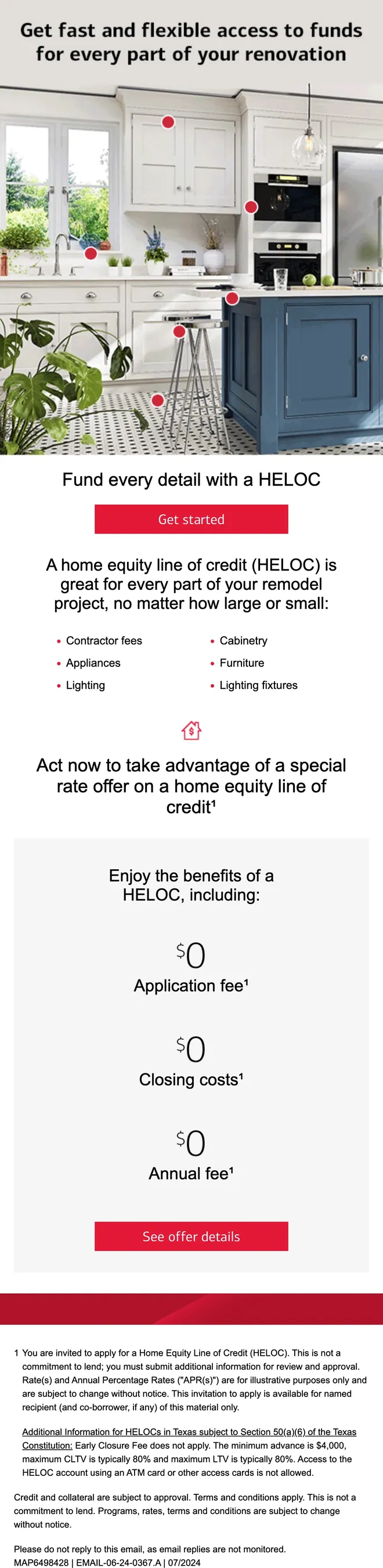
    A home equity line of credit email led by an animated kitchen-renovation hero. Version B removes the special-rate module, shortens the preheader and relabels the closing button, while the rest of the build stays identical.

    Job
    EMAIL-06-24-0367
    Versions
    Version A (with rate offer), version B (without)
    Footer date
    07/2024 and 08/2024
    HELOC renovation, A and B, full-length desktop layout at 550 px.
    HELOC renovation, A and B, full-length mobile layout at 320 px.
    Captures of the HELOC A build with images loaded, from the portfolio render archive. The logo row comes from a shared Content Builder block that only exists inside Marketing Cloud, so it’s missing from these captures. The live HTML is in the lab above.

    What the source shows.

    Eight techniques taken straight from the production files, with the file and line each excerpt comes from. “…” marks where an excerpt is shortened.

    1. Header backgrounds that survive Outlook

      The header image is a cell background for most clients. Desktop Outlook ignores CSS backgrounds, so an Outlook-only block draws the same image and a transparent VML rectangle, with the logo row floating in its text box.

      Inspect in the lab: HELOC A
      EMAIL-06-24-0367_A.htmllines 291–313
      <td background="https://images.em.bankofamerica.com/imgs/MIE/logos/00000_550x76_BG_D.jpg" style="background:url(…) center/cover; …">
        <!--[if gte mso 9]>
        <img src="…/00000_550x76_BG_D.jpg" width="550" height="76" alt="" border="0" style="display:block;"/>
        <v:rect xmlns:v="urn:schemas-microsoft-com:vml" fill="true" stroke="false" style="width:550px; height:76px; position:absolute; top:0; left:0; border:0; z-index:2">
        <v:fill color="#FFFFFF" opacity="0%" style="z-index:1;"/>
        <v:textbox style="mso-fit-shape-to-text:true" inset="0,0,0,0">
        <div>
        <![endif]-->
        …logo row…
        <!--[if gte mso 9]>
        </div></v:textbox></v:fill></v:rect><![endif]-->
      </td>
    2. Purpose-built mobile content

      Key graphics have a 550 px desktop cut and a 320 px mobile cut. The mobile copy is hidden by default, wrapped so desktop Outlook never sees it, and switched on below 767 px while the desktop copy is hidden. The whole email narrows to 320 px at the same breakpoint.

      Inspect in the lab: HELOC A
      EMAIL-06-24-0367_A.htmllines 96–102, 322–329
      .mobile-only {display:none !important;}
      @media only screen and (max-width:767px) { .main-table { width:320px !important; … } … }
      
      <img src="…/05731_Hero_DT_550x654.gif" width="550" height="654" alt="Get fast and flexible access to funds…" … class="hide"/>
      <!--[if !mso]><!-->
      <div style="display:none; overflow:hidden; font-size:0; line-height:0; max-height:0; max-width:0; width:0;" class="mobile-only">
      <img src="…/05731_Hero_M_320x568.gif" width="320" height="568" alt="Get fast and flexible access to funds…" …/>
      </div>
      <!--<![endif]-->
    3. AMPscript tracking on every link

      Links carry Marketing Cloud variables for subcampaign, flight and creative codes, so each click reports against the right send. The values are filled in at send time; in this portfolio copy they appear as written.

      Inspect in the lab: Homebuyer EN
      EMAIL-04-24-0114_A.htmlline 302
      <a name="bofa_logo_H" href="https://www.bankofamerica.com/mortgage/?subCampCode=%%=v(@subcampaign_num)=%%&scsCampCode=%%=v(@subcampaign_num)=%%&FlightNum=%%=v(@flight_num)=%%&cm_mmc=CRE-HomeLoans-_-email-_-CA24EM00C0_bofa_logo-_-%%=v(@creative_code)=%%" target="_blank">
    4. Shared blocks from Content Builder

      The HELOC builds pull the Bank of America logo from a shared Content Builder block instead of hard-coding it, so a brand change updates every email that uses it. A second block reference sits commented out in the footer.

      EMAIL-06-24-0367_A.htmllines 305, 437
      %%= ContentBlockByKey("Logo_BofA") =%%
      …
      <!-- %%=ContentBlockByKey("NH_Folder_Name")=%% -->
    5. Footnotes that link both ways

      Every footnote marker jumps to its disclosure, and every disclosure links back to the place it was cited. Each anchor has a spoken label, and the return link is invisible text that only screen readers announce.

      Inspect in the lab: Homebuyer EN
      EMAIL-06-24-0367_A.html, EMAIL-04-24-0114_A.htmllines 379, 419; 449
      <!-- citation -->
      …credit<a href="#footnote_num1" name="footnote_num1b" aria-label="footnote 1" style="color:#000000; text-decoration:none;"><strong style="color:#000000; font-weight:normal;">&#185;</strong></a></h2>
      
      <!-- disclosure -->
      <a name="footnote_num1" aria-label="footnote 1" style="color:#000000; text-decoration:none;"><strong style="color:#000000; font-weight:normal;">1</strong></a>
      
      <!-- return link -->
      <a href="#footnote_num1b" aria-label="back to content" style="color:#fff; text-decoration:none;"><strong style="color:#fff; font-weight:normal;">&nbsp;</strong></a>
    6. A full Spanish edition

      The Spanish version declares its language for screen readers and translates the spoken labels on the disclosures, alongside its own masthead artwork and copy.

      Inspect in the lab: Homebuyer ES
      EMAIL-04-24-0114_B.htmllines 2, 466, 469
      <html lang="es" xml:lang="es" xmlns="http://www.w3.org/1999/xhtml" xmlns:v="urn:schemas-microsoft-com:vml" xmlns:o="urn:schemas-microsoft-com:office:office">
      …
      <a name="footnote_num1" aria-label="nota al pie 1" …>…</a>
      …
      <a href="#footnote_num1b" aria-label="volver al contenido" …>…</a>
    7. Type and spacing that hold in Outlook

      Live text uses the Connections brand face with Calibri and Arial behind it. Line height is restated for Outlook with mso-line-height-alt, and margins are written with a capital M, a long-standing workaround for Outlook.com stripping margin properties.

      Inspect in the lab: Merrill offer
      EMAIL-03-24-0186.htmllines 290, 384–385
      <h1 style="font-family:'Connections', 'Calibri', Arial, Helvetica, sans-serif; font-size:38px; font-weight:normal; line-height:1.2; mso-line-height-alt:90%; Margin:0;" class="fsz28">Invest in your future without investing all your&nbsp;time</h1>
      …
      <ol style="Margin-top:1px; Margin-bottom:1px;">
        <li style="font-family:'Connections', 'Calibri', Arial, Helvetica, sans-serif; font-size:16px; color:#000; line-height:1.5; mso-line-height-alt:120%; Margin-top:1px; Margin-bottom:1px;">Answer a few questions about your&nbsp;goal and&nbsp;risk tolerance.</li>
    8. Versioned builds for testing

      The HELOC email shipped as two versions from one build. B drops the special-rate module and its icon, shortens the preheader and relabels the closing button from “See offer details” to “See HELOC details”. Header, hero, lists, links and the rest of the layout stay the same.

      Inspect in the lab: HELOC B
      EMAIL-06-24-0367_A.html → _B.htmllines 282; 377–383; 394 → 388
      <!-- preheader -->
      From start to finish, a HELOC is designed to handle all the costs associated with your next home renovation. Get started now with a special rate offer.
      From start to finish, a HELOC is designed to handle all the costs associated with your next home renovation. Get started now.
      
      <!-- offer module: in A only -->
      <h2 …>Act now to take advantage of a special rate offer on a home equity line of credit<a href="#footnote_num1" …>&#185;</a></h2>
      
      <!-- closing button -->
      <img src="…/05731_CTA_SeeOfferDetails_280x44_2x.jpg" width="280" height="44" alt="See offer details" …/>
      <img src="…/05731_CTA_SeeHELOCdetails_280x44_2x.jpg" width="280" height="44" alt="See HELOC details" …/>

    The work behind each send.

    At Tamman Inc., the work meant building Bank of America marketing emails as production HTML for Salesforce Marketing Cloud. The files on this page show what that covered.

    • Responsive builds at 550 px with dedicated 320 px mobile layouts and artwork swaps.
    • Desktop Outlook support through conditional comments, VML backgrounds and Outlook-specific line heights.
    • Marketing Cloud integration: AMPscript tracking variables on every link, Content Builder blocks and personalization slots.
    • Regulated content: numbered disclosures, state-specific notices and footnotes that link both ways.
    • Accessibility: declared language, an article landmark, real headings, alt attributes on every image (empty on decorative ones) and spoken labels on footnotes.
    • Versions and languages: A/B builds from one base and a full Spanish edition.
    • Job tracking: every build carries its EMAIL job number and MAP reference in the footer.

    How these files are shown

    Straight from production

    The HTML, copy, layout, image references, AMPscript and disclosures are as built. The Source view and code checks read each file with one change: a third-party page-monitoring script, picked up when the file was saved from its hosted “view online” page, is removed.

    Added for this preview

    A label above each email, markers on each module row for the inspector, and a noindex tag. Where an email inserts the logo from a shared Content Builder block, the preview shows the logo image that block inserts. Nothing in these emails was redesigned or rebuilt.

    Not verified here

    Rendering in real email clients. These previews run in your web browser, and no Outlook, Gmail or Apple Mail results are claimed. Campaign performance figures aren’t available and aren’t claimed either.


    Start a conversation

    Let’s make your next send exceptional.

    The same production discipline, applied to your emails, or to your clients’ emails under your agency’s name. Tell us what you’re working on.